
Ask one question. KAI does the running around.
KAIgentics is Kasisto's agentic AI platform for financial institutions. On the consumer side it powers KAI for your customers. Here, the same platform sits behind the counter, taking employee requests in plain language and quietly handling the coordination work that used to take hours of clicks, emails, and follow-ups.
Less coordination · Faster decisions · Humans keep the judgment
KAI answers customers. KAIgentics runs the back office.
The consumer demo at Get Kasisto shows KAI helping a customer bank, borrow, invest, and plan. Here, the same agentic foundation gives the hours back to the people behind the counter, the employees, managers, and operations leaders who keep the institution running.
For your customers
- • Conversational banking, borrowing, investing, planning.
- • Personalized to the account holder, behind your login.
- • Resolves 80–87% of inbound inquiries without a handoff.
For your employees
- • One conversation replaces tool-hopping across six systems.
- • Manual coordination, report-gathering, and approval chasing disappear.
- • Every action is reviewable, employees stay firmly in control.
Employees ask. KAI coordinates the work.
Employees don't need to know where data lives or which system to open. They ask once, KAI figures out who should handle what, runs the steps, and brings back a single answer. Each specialist owns its tools, its data, and its policy scope, so the work happens safely without the employee threading it together.
Client Segmentation
Stops manual portfolio combing, hands RMs the right client list, on demand.- From the orchestrator
- Natural-language criteria from the orchestrator (segment, product holdings, balances, tenure, geography).
- What it does
- Queries the core, CRM, and marketing systems; de-duplicates; applies suppression and consent rules; returns a scoped list with counts and rationale.
- Back to the employee
- Returns the list and the criteria it used, so the employee can review, refine, or push to the campaign tool.
Employee Onboarding
Removes onboarding coordination, provisions, schedules, and tracks without a checklist.- From the orchestrator
- Role, department, start date, and manager from the orchestrator (sourced from HRIS or the employee).
- What it does
- Provisions accounts, requests entitlements based on role templates, schedules training, assigns a buddy, and opens any compliance attestations the role requires.
- Back to the employee
- Hands a ready-to-work checklist back to the manager and flags any item that needs a human approval before it can proceed.
Employee Offboarding
Closes out departures consistently and safely, auditable without anyone assembling the trail.- From the orchestrator
- Departing employee, last day, and reason code; pulled from HRIS or supplied by the manager.
- What it does
- Revokes entitlements on the right schedule, transfers ownership of pipelines and clients, archives mail and files per retention policy, and triggers final-pay and exit-survey workflows.
- Back to the employee
- Returns a single timeline view of what was revoked, when, and what still requires a manager signature.
Client Insights
Surfaces customer opportunities and risks automatically, no investigation required.- From the orchestrator
- Time window, book of business, or segment from the orchestrator.
- What it does
- Joins product usage, balance trends, NPS, and recent service contacts. Scores accounts for momentum and risk. Cites the underlying data points behind every score.
- Back to the employee
- Returns a ranked list with a one-sentence why for each account and suggested next actions the employee can take inline.
Trends
Catches operational shifts as they happen, so no one has to read another weekly report.- From the orchestrator
- Metric or domain (queue volume, channel mix, product adoption, fraud signals) and comparison window.
- What it does
- Pulls warehouse data, detects statistically meaningful shifts versus baseline, decomposes the change by branch, segment, and channel, and explains plausible drivers in plain language.
- Back to the employee
- Returns a short brief with the chart, the decomposition, and a recommended action, ready to forward to a stakeholder.
From a sentence in chat to finished work, no manual coordination in between.
The same governed path runs every request. Employees see a conversation; underneath, the work that used to require six tabs, three emails, and a follow-up just happens.
- 1. Capture
The employee asks in plain language, no need to know which system holds the answer or which form to fill out. Identity, role, and department are already attached from SSO.
- 2. Interpret
KAI figures out what's actually being asked, extracts the relevant details, and checks permissions, work the employee would otherwise do mentally before opening anything.
- 3. Route
Instead of the employee hopping between tools and chasing owners, KAI sends each piece of the work to the right specialist with the right access.
- 4. Execute
The specialists pull from core banking, HRIS, IAM, CRM, the warehouse, and document stores, so the employee doesn't have to. Progress streams back as it happens.
- 5. Verify
Findings are grounded against the source systems and run through policy and compliance checks. Anything above the employee's authority pauses for a human approval, by design.
- 6. Respond and log
One stitched-together answer comes back with citations and a 'what I did' summary. The employee reads, decides, acts, and the audit trail writes itself.
Built so employees never have to think about any of this.
The architecture is here for the people who need to see it. For everyone else, the point is simpler: ask, get the answer, decide.
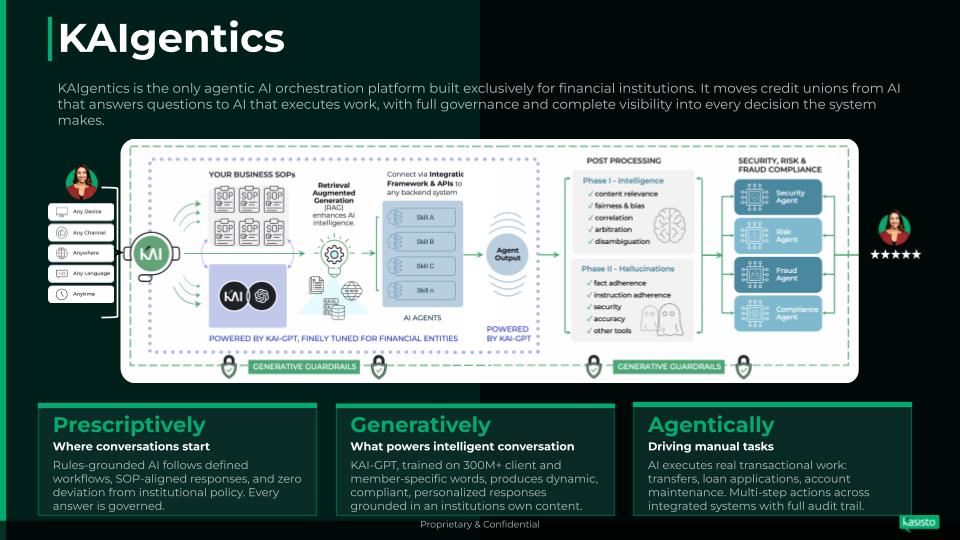
Employee surfaces
Employees ask wherever they already work, the workspace chat, an embedded panel, Slack/Teams. No new tool to learn; identity travels with the request.
Orchestration layer
Turns one plain-language question into the right sequence of steps, holds context across handoffs, and writes the audit trail so no one else has to.
Specialist agents
Five purpose-built agents handle segmentation, onboarding, offboarding, insights, and trends, each scoped to the right systems with guardrails baked in.
Grounding and governance
Answers are checked against the source systems, policy filters and approval gates run in-line, and humans approve anything above their authority, by design, not as an afterthought.
Hours back. Better days.
Building a segment, onboarding a hire, or closing out a departure runs as one conversation, not a checklist across six tools.
Employees ask once. KAI picks the right path, in the right order, with the right data.
Operational shifts and at-risk customers surface as they happen, not in next quarter's review.
Access, training, and a buddy are in place before the first standup. Managers welcome instead of chase.
Access closes on schedule, work gets reassigned, and the audit trail writes itself.
Every action is logged with inputs, outputs, and rationale, ready for risk, compliance, and audit without anyone assembling it.
Put hours back in your week.
Ask KAI anything you'd ask your ops team, a client list, an onboarding, an offboarding, an adoption question, a trend, and watch the coordination work disappear. Or book time to see it grounded in your own systems and policies.